
Recover: failed-payment recovery
Brightdesk finds past-due accounts, sees why each payment failed, and recovers the revenue with retries, card-update requests and offline payments.
The story
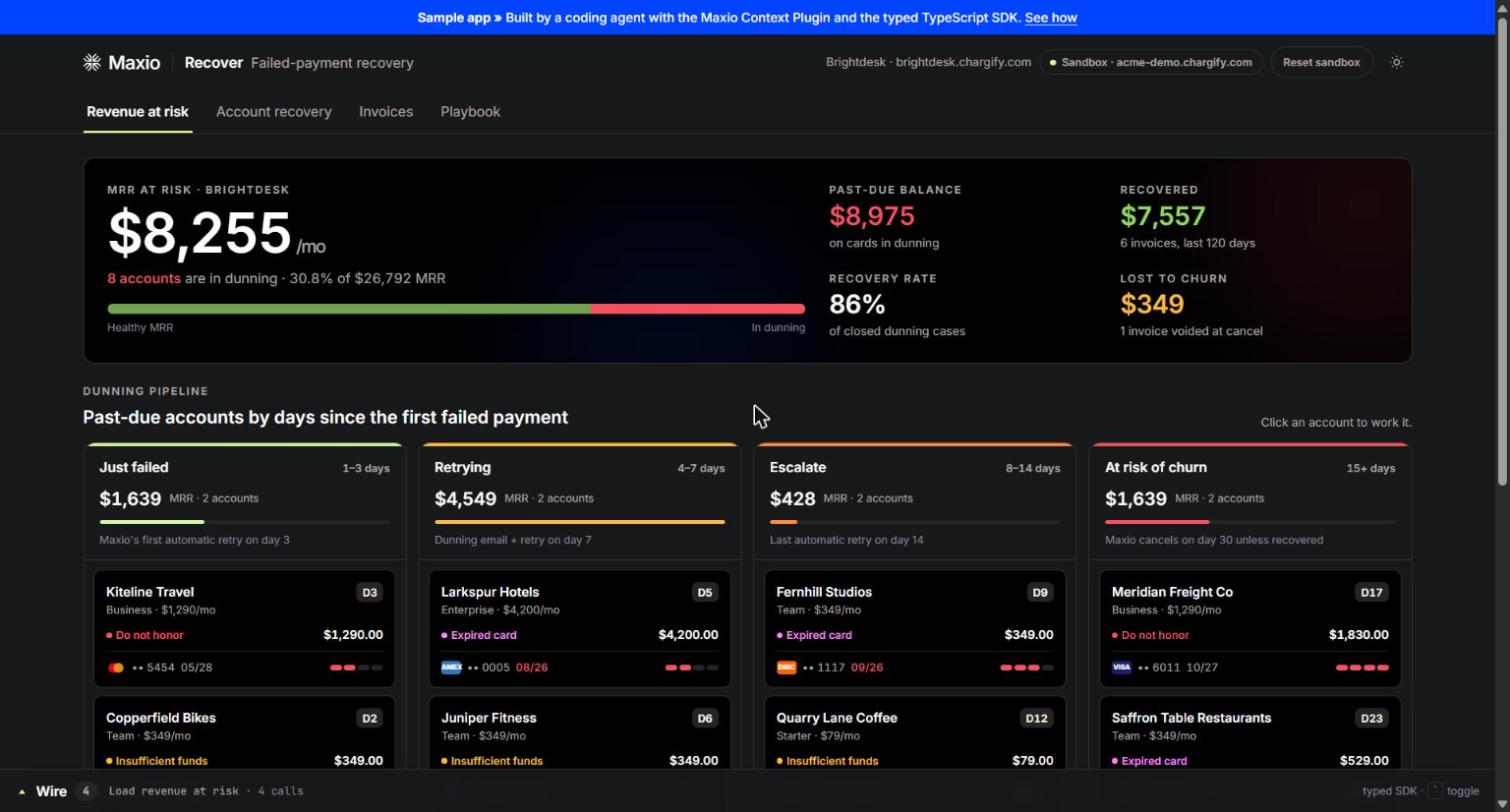
Brightdesk is a fictional help-desk SaaS that bills on Maxio Advanced Billing. Recover is its collections cockpit. It shows every past-due account grouped by how long it has been overdue, why each card payment failed, and each invoice's full history. From there the team can retry a card, ask for a new one, record a payment made by check, or pause a subscription.
| At a glance | |
|---|---|
| Use case | Dunning, failed payments, accounts receivable |
| SDK operations | 15 |
| Live app | mxo-recover.pages.dev |
Screens
| Screen | What you see and do | SDK calls |
|---|---|---|
| Revenue at risk | MRR at risk as a share of total MRR. Past-due accounts by days overdue (1–3, 4–7, 8–14, 15+) with the decline reason and card on file. A recovery funnel | subscriptions.listSubscriptions, invoices.listInvoices, invoices.listInvoiceEvents, insights.readMrr |
| Account recovery | The card on file (flagged if expired) and a timeline of every invoice event. Retry the card, request a card update, record an offline payment, pause, resume or stop dunning | subscriptions.readSubscription, invoices.readInvoice, paymentProfiles.listPaymentProfiles, subscriptionStatus.retrySubscription, paymentProfiles.sendRequestUpdatePaymentEmail, invoices.recordPaymentForInvoice, subscriptionStatus.pauseSubscription, subscriptionStatus.resumeSubscription, subscriptionStatus.cancelDunning |
| Invoices | Accounts receivable aging (0–30, 31–60, 61–90, 90+ days). Record one payment across several invoices, or void an invoice with a reason | invoices.listInvoices, invoices.recordPaymentForMultipleInvoices, invoices.voidInvoice |
| Playbook | The dunning timeline: what Maxio does automatically and what the team does, with today's past-due accounts on their step | Reuses the overview data |
SDK operations
| Operation | SDK method | Used for |
|---|---|---|
| List subscriptions | subscriptions.listSubscriptions | Past-due accounts |
| Read subscription | subscriptions.readSubscription | One account |
| List invoices | invoices.listInvoices | Open and past-due invoices |
| Read invoice | invoices.readInvoice | The amount due before a payment |
| List invoice events | invoices.listInvoiceEvents | Declines, payments and voids on the timeline |
| Record payment for an invoice | invoices.recordPaymentForInvoice | A check or wire payment |
| Record payment for multiple invoices | invoices.recordPaymentForMultipleInvoices | One check across several invoices |
| Void invoice | invoices.voidInvoice | Write off with a reason |
| List payment profiles | paymentProfiles.listPaymentProfiles | The card on file |
| Send request update payment email | paymentProfiles.sendRequestUpdatePaymentEmail | Ask for a new card |
| Retry subscription | subscriptionStatus.retrySubscription | Retry the card now |
| Pause subscription | subscriptionStatus.pauseSubscription | Put an account on hold |
| Resume subscription | subscriptionStatus.resumeSubscription | Take it off hold |
| Cancel dunning | subscriptionStatus.cancelDunning | Stop automatic dunning |
| Read MRR | insights.readMrr | Total MRR for the at-risk share |
Code: retry a card and handle Maxio's answer
import { SubscriptionStatus } from "maxio-advanced-billing";

try {
  const { subscription } = await client.subscriptionStatus.retrySubscription({ subscriptionId });
  const recovered = subscription?.state !== "past_due";
} catch (err) {
  // A subscription that is not past due answers 422; narrow on this operation's own error type
  if (err instanceof SubscriptionStatus.RetrySubscriptionError && err.payload.kind === "errorListResponse1") {
    showMessage(err.payload.body.errors.join("; "));
  } else throw err;
}
Errors shown on purpose
- Maxio 422s: retrying a subscription that is not past due, voiding an invoice that is already void, pausing a canceled subscription, and resuming one that is not on hold.
- App rules: an offline payment larger than the amount due (the invoice is re-read first), and a void without a reason, are blocked before Maxio sees them.
Shift: plan changes with proration
Northwind Analytics changes plans, seats and add-ons, previewing every proration first, and keeps customers with coupons and scheduled cancellations.
Groupwise: B2B consolidated invoicing
Orbital Cloud bills enterprises with many business units on one consolidated invoice, using subscription groups, proforma quotes and group payment profiles.